IPTV Player - Smart Live TV
- 4.3
- Rating
- 10.00M
- Installs
- Free
- Price
 Analysis by App-foxy
Watching live television on a phone sounds simple until the network becomes part of the viewing experience. IPTV Player - Smart Live TV is an entertainment app from Metaverse Labs that puts an IPTV playlist and a built-in player in one place. I found its appeal less about replacing every television service and more about making a compatible live-TV setup easier to open, browse, and watch while moving between screens.
The app is free to install and aimed at Everyone, which makes it approachable for casual viewers as well as people who already use IPTV playlists. It has reached over 10 million installs and holds a 4.4 average from around 1.3 million ratings, so it is clearly familiar to a large audience. Those figures do not guarantee that every playlist will behave perfectly, though. In practice, the quality of the experience depends heavily on the source you use and the connection available when you press play.
How IPTV Player - Smart Live TV behaves when the network matters
The first thing I would explain to a friend is that this is a player, not a magic television subscription. The app can provide the viewing interface, but the channels in an IPTV playlist still determine what is available and how reliably it plays. That distinction matters because a polished player cannot repair a stream that is unavailable, overloaded, restricted, or simply unstable.
You May Also Like

 Blood Strike: 2.5 Anniversary
Blood Strike’s Loadouts Turn Every Drop Into a Tactical Gamble
A close look at Blood Strike’s custom loadouts: how fast access to signature weapons reshapes its battle royale rhythm, rewards preparation, and narrows the gap between fights.

 Pandora - Music & Podcasts
Pandora’s Music Is Easy to Start, but Harder to Recover
Pandora’s strength is its low-effort path from a seed to a station. Its weak spot is how much confidence it asks you to place in connection, setup, and quiet recovery.

 8 Ball Pool
 Is Built on Rivalries, Rematches, and Routine
A close look at the rivalries, rematches, shared routines, and unanswered safety questions that turn a quick pool match into a persistent mobile community.

 Samsung Music
’s Quiet Strength Is Playing What You Already Own
Its reach comes less from spectacle than from dependable access to a personal library. That simplicity is both the app’s strongest retention engine and its ceiling.

 AccuWeather: Weather Radar
AccuWeather Review: A Quick, Clear Forecast for Everyday Decisions
For everyday plans, the best forecast is the one you can understand quickly. AccuWeather makes rain timing, radar, and local conditions easy to act on, with a few trade-offs.

 Hill Climb Racing
Why Hill Climb Racing Still Turns Crashes Into One More Run
A tiny car, a bumpy hill and one more upgrade: Hill Climb Racing keeps resurfacing because its simple chaos makes every near-miss feel personal.
More From Our News Desk



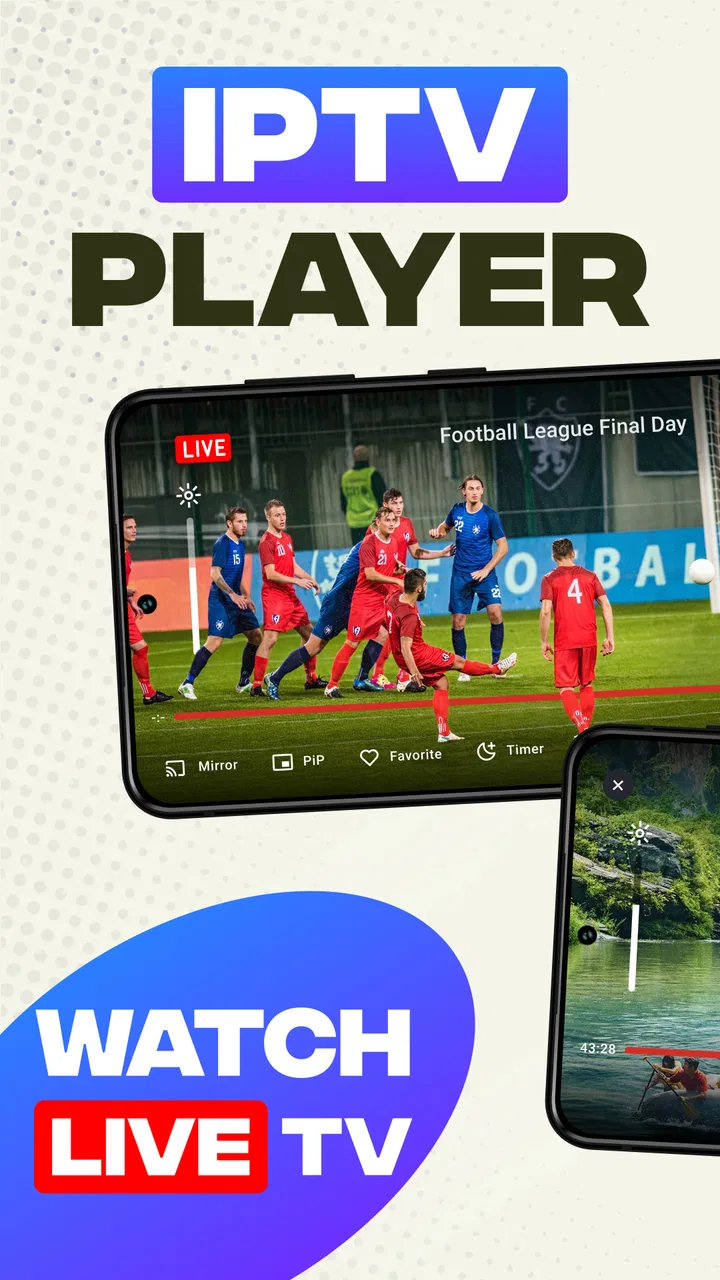
When the playlist and connection cooperate, the built-in player is convenient. I can stay inside the same app instead of moving between a playlist source and a separate video application. That reduces small annoyances during ordinary viewing: selecting a channel, returning to the list, and trying another stream all feel like parts of one workflow rather than separate tasks.
Live television is less forgiving than on-demand video. With a film, a short pause may be hidden by buffering before playback begins. A live channel has to keep pace with an ongoing broadcast, so a weak connection can show itself as loading, interruptions, or a sudden drop in continuity. This is where the app’s usefulness becomes closely tied to the network rather than just its menus.
I noticed that the best way to judge a channel is not to assume that the first failed attempt means the entire app is broken. A playlist can contain several entries with different levels of reliability. Trying another channel, reopening the stream, or checking whether the problem affects only one source helps separate a playlist issue from a broader connectivity problem.
What happens during everyday viewing
Imagine using it during breakfast to catch a live news channel before leaving home. On a strong household connection, the process is straightforward: open the playlist, choose the channel, and let the built-in player handle playback. If the same routine happens over a crowded mobile connection, the result can change quickly. A channel that opened smoothly yesterday may take longer today because the surrounding network conditions are different.
That makes the app a good fit for short, flexible viewing sessions. I can use it when I want live content without committing to a full television setup, especially if I already know which playlist entries are dependable. It is less reassuring when I need guaranteed uninterrupted coverage, such as following an important live event where missing several minutes would be frustrating.
The app’s category placement as entertainment feels accurate, but the experience is more practical than a typical catalog of on-demand shows. It depends on the channels you bring into it. Someone expecting a ready-made library with familiar programs may find the first setup less immediate than opening a mainstream streaming service and selecting a title from its home screen.
Using it on a phone and moving between places
Mobile viewing is where an IPTV player can make the most sense. A phone is already available in a waiting room, during a commute stop, or in another room where there is no television nearby. The built-in player keeps the viewing path compact, which is useful when I do not want to manage multiple apps while standing or traveling.
At the same time, a phone is also where connection changes are most noticeable. Moving between Wi-Fi and cellular service can interrupt a live stream. Passing through an area with weaker coverage can make playback less consistent, even if the playlist itself is perfectly valid. I would therefore treat it as a flexible mobile companion rather than assume it will behave like a traditional broadcast signal everywhere.
A practical habit is to test the channels you care about before leaving home. I prefer to open a few likely choices on my usual connection, note which ones begin promptly, and avoid relying on an untested entry when I am already away from a stable network. This small check is more useful than judging the app from one random channel.
The minimum operating-system requirement is Android 9, which keeps the app accessible to many existing devices without targeting only the newest phones. The current version is 7.7. On a phone that meets the requirement, the important question is not just whether the app installs, but whether the device and network combination can maintain live playback comfortably while other activity is happening in the background.
I would also be careful with battery expectations during longer mobile sessions. Any live video player keeps the screen and network active, so extended viewing can be more demanding than checking a short clip. That is not a flaw unique to this app, but it affects whether the mobile use case feels convenient. For a brief news update it is easy to justify; for hours of viewing, a larger screen and stable household connection may be the better choice.
Recovering when a stream stops
Failure recovery is the part that separates a pleasant IPTV tool from a frustrating one. When playback stops, I first look at the scope of the problem. If only one channel fails while others open, I treat that as a source problem and move on rather than repeatedly restarting the same entry. If several channels fail, I check the connection and reopen the app before spending time changing playlist choices.
That workflow sounds obvious, but it prevents a common mistake: blaming the player for every interruption. The app controls the interface and playback environment, while the stream provider controls much of the actual live feed. Knowing that boundary helps set realistic expectations and makes troubleshooting faster.
For a quick recovery, I would try these steps in order: return to the channel list, select a different entry, reconnect to the current network if it is behaving poorly, and then reopen the original stream. If the issue continues across multiple channels, waiting for the connection to stabilize is more sensible than repeatedly tapping play. Live streams do not always recover simply because the same button is pressed several times.
One useful trade-off is convenience versus certainty. Keeping several familiar channels in reach makes switching easy when one source fails, but it also means the viewing experience may vary from entry to entry. A person who wants one dependable service with a controlled catalog may prefer a conventional streaming platform. Someone comfortable choosing among IPTV sources may appreciate the flexibility more.
I would not recommend this app to a viewer who dislikes troubleshooting altogether. The setup can be rewarding when you understand your playlist, but it is not the same as opening a subscription app where the provider manages the catalog, playback delivery, and support experience together. Here, the user has more responsibility for identifying which stream deserves trust.
Keeping mobile data under control
Live video can consume a meaningful amount of mobile data, so I would avoid treating cellular viewing as an unlimited habit unless the plan and coverage make that comfortable. The app’s free installation does not mean watching live streams has no practical cost. Your network plan, battery, and time all become part of the decision.
My preferred approach is to reserve longer sessions for a reliable Wi-Fi connection and use cellular data for brief checks. Before opening a channel on the move, I ask whether I genuinely need live video or whether waiting until I am back on Wi-Fi is sensible. This is especially important when the connection is unstable, because repeated failed starts can be wasteful without producing much viewing.
It also helps to avoid unnecessary channel hopping when data is limited. Every new live stream attempt adds another connection event, and switching repeatedly during a weak signal can create more frustration than entertainment. I would choose one channel, give it a reasonable chance to start, and switch only when there is a clear reason.
People sharing a household network should remember that live viewing competes with other activity. A video call, game download, or several simultaneous streams can affect how quickly a channel starts and whether it stays smooth. If the app seems unreliable at a busy time, testing it when the network is quieter can reveal whether the issue is local congestion rather than the playlist itself.
In-app purchases range from under a dollar to just under twenty dollars per item. Because the app is free, I would pay attention to any purchase prompt and decide whether it offers something I actually need before confirming. I would not assume that paying automatically improves an external IPTV source or fixes a weak connection; the value of any optional purchase should be judged on its specific benefit inside the app.
Who will enjoy it, and who should choose something else
I think IPTV Player - Smart Live TV is best for someone who already understands the idea of IPTV playlists and wants a single built-in player for live channels. It is also useful for viewers who move between a phone and a larger screen and value quick access over a fully managed content library.
It is less suitable for a person who wants an effortless, ready-to-watch catalog. Mainstream television apps usually make discovery easier because their content, playback delivery, and account system are presented as one service. This player offers a different bargain: more control over the viewing source, but more responsibility when a channel does not work.
Families may appreciate the Everyone content rating, although that label should not be confused with a guarantee that every playlist entry is appropriate for every household. The app is a container for live channels, so I would still pay attention to the sources being added and selected, especially when children use the device.
Another important question is whether it is suitable for travel. I would say yes for occasional viewing when you have a dependable connection and know your playlist, but not as a guarantee of uninterrupted television in every location. Network switching, coverage gaps, and source availability can all change the result. Testing before a trip is the sensible approach.
Compared with a regular television app, this one feels more adaptable but less predictable. Compared with opening streams in a browser, the built-in player is more focused and keeps the viewing process together. Compared with a dedicated hardware IPTV setup, the phone is easier to carry but may be less comfortable for long sessions. The right choice depends on whether flexibility or consistency matters more to you.
My connectivity verdict
After using it as a live-TV tool, I see IPTV Player - Smart Live TV as a capable meeting point between a playlist and a mobile screen. Its strongest quality is convenience: when the source is sound and the network is steady, the built-in player removes unnecessary steps and lets me get to live content quickly.
Its main limitation is also clear. The app cannot make an unreliable stream reliable. Connection quality, playlist maintenance, and the behavior of individual channels shape the result just as much as the interface does. Once I accept that, the occasional failed stream becomes easier to diagnose instead of feeling like a mysterious app-wide problem.
Metaverse Labs has positioned this free entertainment app for a broad audience, and its large install base shows that the basic idea resonates. Still, I would recommend it with a specific expectation: use it as a flexible IPTV player, not as a replacement for every managed television service. Keep a few dependable channels ready, test important streams before you need them, and save extended viewing for a stable connection.
For me, that makes it worth trying if you already have legitimate IPTV playlist sources and want a straightforward mobile viewing option. If your priority is guaranteed playback, effortless discovery, or minimal troubleshooting, a conventional streaming service will probably feel better. If you value portability and are willing to work with the realities of live network delivery, IPTV Player - Smart Live TV earns its place as a practical companion.
FAQs for IPTV Player - Smart Live TV
01What devices are compatible with IPTV Player - Smart Live TV?
IPTV Player - Smart Live TV is designed to work seamlessly on both Android and iOS devices. This includes smartphones and tablets, ensuring you can enjoy live TV on the go. Make sure your device is running the latest operating system version to ensure the best performance and compatibility.
02Does IPTV Player - Smart Live TV offer a free trial?
Yes, IPTV Player - Smart Live TV typically provides a free trial period. This allows potential users to test the features and functionality before committing to a subscription. Be sure to check the app store description or the app's official website for the latest information on trial periods and subscription plans.
03Is there a need for a separate IPTV subscription?
Yes, IPTV Player - Smart Live TV acts as a media player for IPTV services. You'll need a separate IPTV subscription to access content. The app does not provide its own content but allows you to stream channels from your existing IPTV provider. Ensure your IPTV service is compatible with the app.
04How user-friendly is the interface of IPTV Player - Smart Live TV?
The interface of IPTV Player - Smart Live TV is designed to be intuitive and user-friendly. It offers easy navigation through categories and channels, making it simple for users of all ages to find their favorite content. The app also features customizable settings, allowing for a personalized viewing experience.
05What kind of customer support is available for IPTV Player - Smart Live TV?
IPTV Player - Smart Live TV provides various customer support options, including email and in-app support. The app also offers a comprehensive FAQ section and tutorials to help troubleshoot common issues. Response times may vary, but the support team is dedicated to resolving user queries efficiently.
Pros
- User-friendly interface for easy navigation.
- Supports a wide range of video formats.
- Customizable channel lists for personalization.
- High-quality streaming with minimal buffering.
- Compatible with multiple devices and platforms.
Cons
- Requires a stable internet connection.
- No built-in channels; user must add their own.
- Ads can be intrusive without premium upgrade.
- Limited customer support or troubleshooting.
- Some features locked behind a paywall.

IPTV Player - Smart Live TV
Gallery